

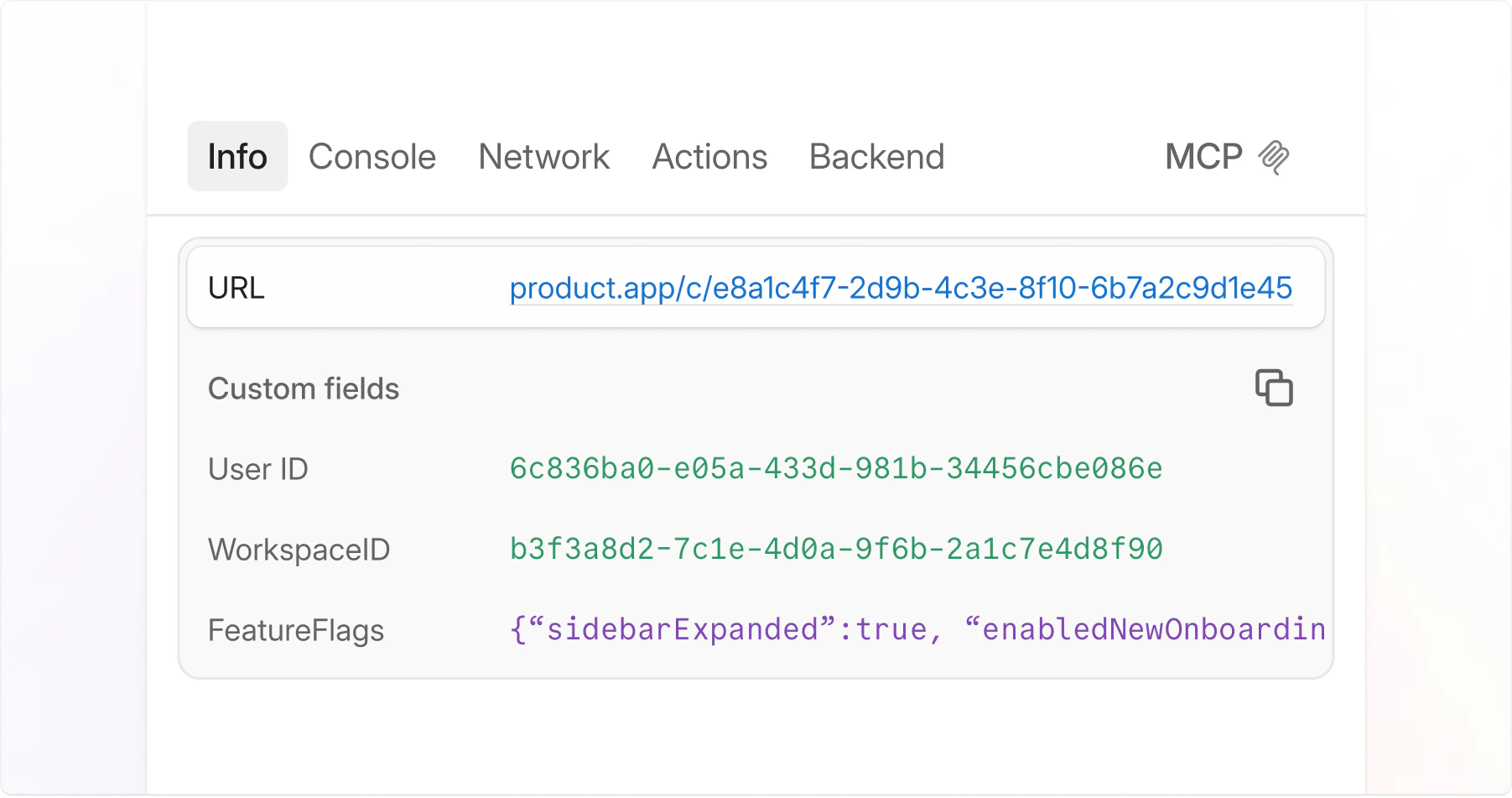
# Custom logs

With one function call, `jam.metadata()`, you can ensure that every Jam submitted from your website includes the metadata you need to debug the bug. Custom logs work on all types of Jams, including requested Jams from [Recording Links](https://jam.dev/docs/request-a-jam/recording-links), [Jam for Customer Support](https://jam.dev/docs/debug-a-jam/devtools/broken-reference) and the Jam browser extension.

<figure><img src="https://1990502200-files.gitbook.io/~/files/v0/b/gitbook-x-prod.appspot.com/o/spaces%2FtAIPUIiSH7MWC0IHLJuD%2Fuploads%2FeDrNtqKPVvRbpMv0MjJG%2Fcustom-logs.png?alt=media&#x26;token=3a32ab23-1efc-44ba-84c6-32d4e9ff5b37" alt=""><figcaption></figcaption></figure>

You can log anything in custom logs: simple static values like `userID`, `teamID` to any data like redux or react state. Whatever you need to debug, just add it to custom logs so it's always there for you in any ticket.

{% embed url="<https://youtu.be/P0Uu4du__9M>" %}

## Getting Started

1. First, install the Jam SDK into your project:

{% code fullWidth="false" %}

```bash
npm install '@jam.dev/sdk'
# or:
yarn add '@jam.dev/sdk'
```

{% endcode %}

2. Once the script is included, you can start using the `jam.metadata` function to include debug information with every Jam a user files on your site:

{% code lineNumbers="true" %}

```tsx
// In the root of your app, the place where
// you would initialize your app's stores and
// render React onto your root element
import { jam } from "@jam.dev/sdk";

// We call the jam.metadata function once.
// The function we pass into it is called whenever
// a Jam is captured, so the data inside is always
// live and never stale.

jam.metadata(() => {
  return {
    userId: 5492,
    teamId: 'd3b59ce8-95f1-410c-bb5e-9dc598599336',
    timeSincePageLoad: performance.now(),
    a: { nested: ['object', 'or', 'array'] }
    // and any other debug data you'd need
});
```

{% endcode %}

3. Now, your metadata will be shown inside every Jam filed from your site!

## What data can you include in custom logs?

Beyond static values and local variables, you can also pass in:

* State from your app stores (for example: user ID, team ID, the last 5 items in your user's checkout cart, which feature flags are enabled, etc.)
* Values from localStorage
* Whatever data you need to debug your bugs!

## Test it out live, Right now!

To see this live, try going to our [example site](https://jamdotdev.github.io/sdk/todo-mobx-example/index.html) and creating a Jam! This example site already has custom logs integrated, so as soon as you capture any kind of Jam, we'll include up-to-date debugging info.

Your Jam should include metadata that looks like the following:

<figure><img src="https://1990502200-files.gitbook.io/~/files/v0/b/gitbook-x-prod.appspot.com/o/spaces%2FtAIPUIiSH7MWC0IHLJuD%2Fuploads%2Fmqic05caLu724jQ0aVXi%2Fimage.png?alt=media&#x26;token=c10a61bd-7e88-432b-8ff3-3ac2827ccae7" alt="" width="375"><figcaption><p>Your site's metadata, included! Try creating more todo items to see how todoItemCount changes</p></figcaption></figure>

Objects provided will be expanded and pretty-printed when you click on them:

<figure><img src="https://1990502200-files.gitbook.io/~/files/v0/b/gitbook-x-prod.appspot.com/o/spaces%2FtAIPUIiSH7MWC0IHLJuD%2Fuploads%2Fs8uUvzirhT9VnyL9Govp%2Fimage.png?alt=media&#x26;token=48d8e433-63a6-48d7-abbf-97a0e941a5fb" alt="" width="375"><figcaption><p>Here, we've snapshotted our app's last todo item, in case rendering it caused the bug!</p></figcaption></figure>

The live code for is [here](https://github.com/Strawberry-Jam-Manufacturers/sdk/tree/main/docs/todo-mobx-example), and the `jam.metadata()` call is [here](https://github.com/Strawberry-Jam-Manufacturers/sdk/blob/main/docs/todo-mobx-example/src/index.tsx), for your reference. This demo shows a realistic example of how to include data from a store. In this case, we use MobX for state management, but you can pull from Redux, Zustand, or any other store you prefer.

## When is metadata captured?

Metadata is captured when a bug reporter decides to create a Jam.

## Limits, Constraints, and Errors

When calling `jam.metadata()`, keep in mind that the returned metadata object must be:

1. An `Object` instance (for example, `{ a: 1, b: 2}`, and not `window`, which is a `Window` instance)
2. Under 10kb in size, when serialized.
3. Serializable. If `JSON.stringify` can't stringify it, we can't store it!

If your app throws an error, or the above conditions aren't met, Jam will both log in your browser's live console, and display an error when the Jam is captured:

<figure><img src="https://1990502200-files.gitbook.io/~/files/v0/b/gitbook-x-prod.appspot.com/o/spaces%2FtAIPUIiSH7MWC0IHLJuD%2Fuploads%2FoVG8sHte0LfRJ9Hsp6A9%2Fimage.png?alt=media&#x26;token=b736ee90-deae-49b5-84f0-2a62aa4f829c" alt="" width="375"><figcaption><p>It says "developers" in monospace, so you know it's for you ;)</p></figcaption></figure>

As always, if you have suggestions or requests for the custom logs feature, or the direction our SDK should evolve in, our inbox is open at <hello@jam.dev>!
